eBay Seller Hub: How to Use Every Tab in 2026

eBay Seller Hub is the free dashboard where you run an eBay selling account: orders, listings, promotions, performance scores, payouts and eBay's own product research data all sit behind one menu at ebay.com/sh. If you sell on eBay at any volume, and especially if you dropship, Seller Hub is where you'll spend most of your working day. This guide walks through every tab as it looks in 2026, the seller-level thresholds that decide whether eBay rewards or restricts you, how to use the free Product Research tool (the old Terapeak), and the dropshipping rule that gets more accounts suspended than anything else.
What is eBay Seller Hub?
Seller Hub replaced the older My eBay Selling page and the paid Selling Manager tools. It pulls everything a seller needs into one place: a customizable overview page, order management, bulk listing tools, marketing campaigns, traffic and conversion reports, service metrics, payouts and research. It costs nothing to use. You only pay for things you'd pay for anyway, such as an eBay Store subscription or Promoted Listings ad fees.
For a dropshipper the value is simple. You don't hold stock, so your margin depends on three things you can see in Seller Hub every morning: whether orders shipped on time, whether listings are getting impressions and clicks, and whether your account health is good enough to keep selling at full visibility.
How to access eBay Seller Hub
Getting in takes a minute:
- Sign in to your eBay account. If you only have a buyer account, register as a seller and link a bank account for payouts first.
- Go to ebay.com/sh/ovw, or hover over My eBay and pick Selling.
- If you haven't used it before, eBay shows a prompt to start using Seller Hub. Accept it and the dashboard loads.
- Bookmark the Overview page. You'll open it more than any other page on eBay.
New business accounts are placed in Seller Hub automatically. Some modules stay empty until you've listed and sold a few items, so don't worry if the Performance tab looks thin in your first weeks.
Every eBay Seller Hub tab, explained
eBay's own developer documentation lists nine tabs: Overview, Orders, Listings, Marketing, Store, Performance, Payments, Research and Reports. The exact sub-menus shift slightly by country and by Store subscription, but the structure below holds for US sellers in 2026.
Overview
The landing page. It shows tasks that need you (unread buyer messages, orders awaiting shipment, open returns and cases), a sales snapshot, your current seller level and your monthly selling limits. You can drag modules around and hide the ones you don't use. Put "Tasks" and "Orders" at the top. A dropshipper who leaves an "item not received" request sitting for three days is paying for it later in account health.
Selling limits matter for new accounts. eBay caps how many items and how much total value you can list each month, and the Overview module shows how close you are. If you hit the ceiling, you can request a higher limit, but eBay looks at your sales history and feedback before agreeing.
Orders
This is your fulfillment queue: All orders, Awaiting payment, Awaiting shipment, Paid and shipped, plus Cancellations, Returns, and Requests and disputes. You can print shipping labels here (singly or in bulk), upload tracking numbers, and handle return requests. When you dropship, the step that matters most is uploading valid tracking from an integrated carrier within your stated handling time. eBay counts on-time shipping from carrier scans, so a tracking number that never updates is almost as bad as no tracking at all.
Listings
Create listings, edit active ones, and manage drafts, scheduled, unsold and ended items. The bulk editor is the part worth learning: you can change price, quantity, shipping policy or item specifics across dozens of listings in one pass. If a supplier raises a price by $2, this is where you fix it before you sell at a loss.
Marketing
All of eBay's promotion tools live here: Promoted Listings campaigns, sale events, coupons, order discounts, volume pricing, and offers to buyers who've watched an item. Promoted Listings comes in two main flavours. The general strategy (previously called Standard) charges your ad rate only when a sale is attributed to the ad. The priority strategy (previously Advanced) is cost-per-click and puts you in top search slots. For thin-margin dropshipped products, start with a modest general campaign on proven sellers and only move to cost-per-click once you know your break-even.
Store
Only relevant if you pay for an eBay Store. Subscription levels are Starter, Basic, Premium, Anchor and Enterprise. This tab handles your storefront design, custom store categories, newsletters to followers, and Time Away settings, which pause or flag your listings while you can't ship. Dropshippers should use Time Away when a supplier closes for a holiday (Chinese New Year catches people every year).
Performance
Probably the most important tab. It breaks into Summary, Seller level, Sales, Traffic and Service metrics. Traffic shows impressions, click-through rate, page views and conversion by listing, which tells you whether a listing has a visibility problem (low impressions) or a conversion problem (plenty of views, no sales). Service metrics compares your "item not as described" and "item not received" rates against sellers in the same category. More on seller levels below.
Payments
Payouts, every transaction, fees, refunds, holds, tax documents and downloadable reports. If you want to know what you actually made on a product, export the transaction report here rather than trusting the sale price. The fee lines add up fast. Our eBay fees calculator works out each one so you can price before you list, not after.
Research
Product research data from eBay itself, covered in its own section below because it's the most underused free tool on the platform.
Reports
Bulk upload and download. You can upload a file to create or revise hundreds of listings, schedule recurring order reports, and pull CSV exports for your own spreadsheets. Once you pass 50 or so active listings, this tab saves hours.
| Tab | What you use it for | How often to check |
|---|---|---|
| Overview | Tasks, sales snapshot, selling limits | Daily |
| Orders | Ship, upload tracking, returns, cancellations | Daily (twice in peak season) |
| Listings | Create, bulk edit price and stock | Daily for dropshippers |
| Marketing | Promoted Listings, coupons, sale events | Weekly |
| Store | Storefront, categories, Time Away | Monthly |
| Performance | Seller level, traffic, service metrics | Weekly, and before the 20th |
| Payments | Payouts, fees, tax forms | Weekly |
| Research | Product research and sourcing insights | Whenever you add products |
| Reports | Bulk uploads, scheduled exports | As needed |
Seller levels and performance metrics in Seller Hub
eBay grades every seller on a monthly cycle, and your level changes how much visibility and how many fee discounts you get. The minimum standards are published in eBay's seller standards policy.
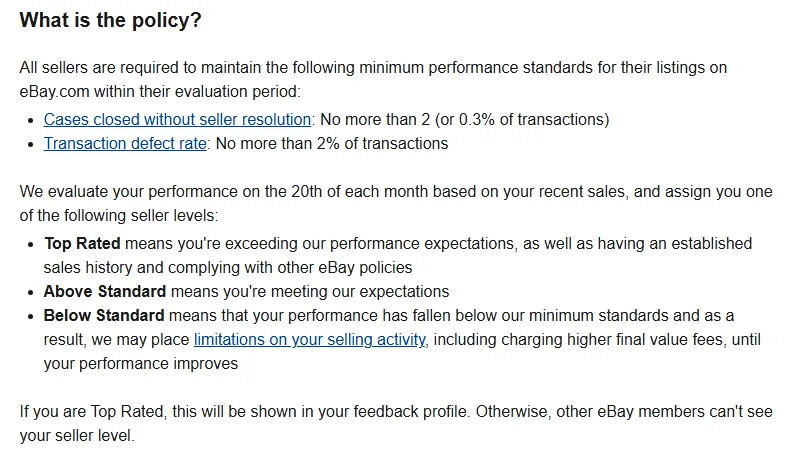
There are three levels:
- Top Rated: you beat the minimums by a wide margin and have an established sales history.
- Above Standard: you meet eBay's minimums.
- Below Standard: you've fallen under the minimums. eBay can limit your selling activity and charge higher final value fees until you recover.
The numbers behind those labels:
| Metric | Minimum (all sellers) | Top Rated (US) |
|---|---|---|
| Transaction defect rate | No more than 2% | 0.5% or less |
| Cases closed without seller resolution | No more than 2 cases or 0.3% | 0.3% or less, max 2 cases |
| Late shipment rate | No fixed minimum | 3% or less |
| Sales history | None | 100+ transactions and $1,000+ with US buyers in 12 months, account open 90+ days |
How the evaluation works
eBay runs the evaluation on the 20th of each month. If you had more than 400 transactions in the past three months, it looks at those three months. If you had fewer, it looks back over the last 12 months. That second rule is the one new dropshippers forget: one bad week with 6 cancellations can sit on a small account's record for a year.
A transaction defect is either a seller cancellation (you cancel because the item is out of stock, which happens a lot when a supplier sells out) or a case closed without seller resolution. eBay only moves you to Below Standard for defects once they involve more than 4 different buyers, which is a small safety net, not a strategy.
One change for 2026: eBay's policy page notes that from October 15, 2026, eBay Live transactions no longer count toward seller standards or service metrics. They'll be evaluated under a separate program.
Late shipment rate
With tracking uploaded, eBay counts an item as late when the carrier's delivery scan comes after the latest estimated delivery date and there was no carrier scan within your handling time. A high late shipment rate on its own won't push you to Below Standard, but you won't reach Top Rated without keeping it at 3% or less. For dropshippers using slow overseas shipping, set an honest handling time and a realistic shipping service in your listing. A 10 to 20 business day estimate that you hit beats a 5 day estimate that you miss.
Top Rated Plus
Top Rated sellers who offer same-day or 1 business day handling and free returns of 30 days or longer get the Top Rated Plus badge on qualifying listings and a 10% discount on final value fees, according to eBay's seller levels page. Same or next-day handling is hard to promise when a supplier ships for you, which is one reason many eBay dropshippers lean on US warehouse suppliers. Our guide to US-based dropshipping suppliers covers the options.
Product research (Terapeak) in Seller Hub
Terapeak was a paid research service that eBay bought and folded into Seller Hub. Since April 2021 its Product Research tool has been free to every seller with Seller Hub access, and eBay now simply calls it Product research under the Research tab.

According to eBay's Product research help page, the tool gives you up to three years of eBay sales data. Search a keyword or product and you see average sold price, total sold, sell-through rate, number of sellers, average shipping cost, and how many sales were free shipping. Filters cover category, condition, format, and buyer and seller location.
Sourcing insights, the companion tool that flags categories where buyer demand outpaces supply, is included with a Basic Store subscription or higher.
A quick way to read the numbers
Say you search "heated eye massager" over the last 90 days and see 640 sold, 1,100 active listings and an average sold price of $34.20. Sell-through compares items sold with items listed, so 640 sold against roughly 1,740 total listings gives you about 37%. That's healthy demand. Now open the Sold listings tab and sort by date. If the top sellers all ship from the US in 2 to 4 days and you'd be shipping in 12, you're competing on the one thing eBay buyers care about most. If the average sold price minus your supplier cost, shipping and eBay fees leaves under $6, move on.
Product research only shows what's selling on eBay. To see what's taking off on Shopify stores and in Facebook and TikTok ads before it floods eBay, pair it with an outside tool. We compared the options in our roundup of the best eBay product research tools.
eBay's dropshipping policy: what Seller Hub won't warn you about
Dropshipping is allowed on eBay. A specific type of dropshipping is not, and this is where a lot of new sellers lose their accounts.
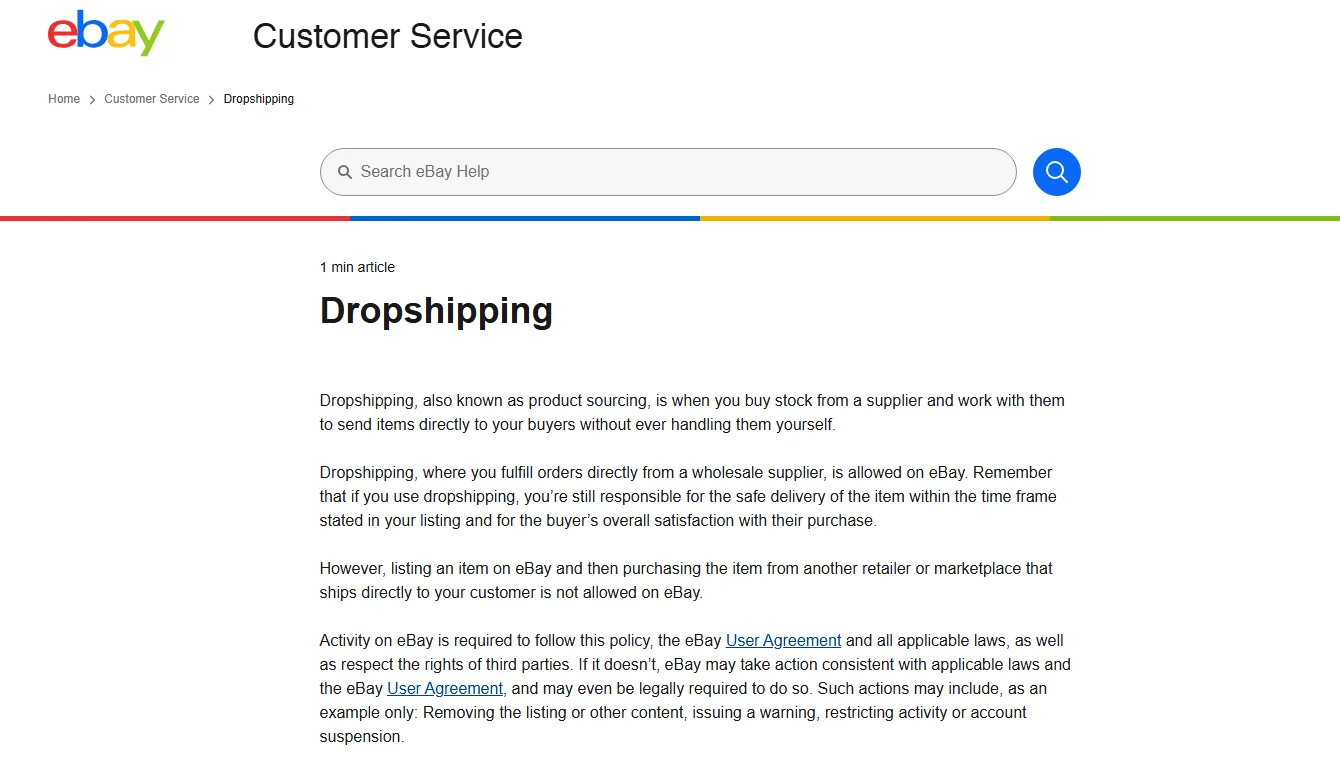
The wording on eBay's dropshipping policy page is clear. Fulfilling orders directly from a wholesale supplier is allowed. Listing an item on eBay and then buying it from another retailer or marketplace that ships straight to your customer is not. That rules out the classic "list a Walmart or Amazon item at a markup, then order it from Walmart when it sells" model, often called retail arbitrage dropshipping. Buyers get a box with another retailer's branding and invoice, they complain, and eBay can remove listings, restrict your account or suspend it.
Either way, you're responsible for the item arriving on time and for the buyer's satisfaction. If your supplier ships late, it's your late shipment and your defect.
What that means in practice:
- Work with real wholesale or dropship suppliers who ship unbranded or with your branding. Our guide on how to find dropshipping suppliers covers how to vet them.
- Get tracking that integrates with eBay's carrier list, so scans count toward on-time delivery.
- Have a plan for returns, since eBay's buyer protection puts the refund on you. See our dropshipping returns and refunds guide.
Seller Hub tips for eBay dropshippers
- Check Performance before the 20th. The Seller level page shows a projected level based on today's numbers. If it's sliding, resolve open requests and avoid cancellations until after evaluation.
- Never cancel for "out of stock" if you can avoid it. Each one is a defect. Sync stock from your supplier daily and keep quantities low (2 or 3 per listing) so a supplier stock-out doesn't oversell you.
- Use the Traffic report to triage listings. Low impressions means fix the title and item specifics. High impressions with a click-through rate under 1% means fix the main photo and price. Plenty of clicks with no sales means look at shipping time and returns.
- Bulk edit prices when suppliers change theirs. A weekly ten-minute pass in Listings beats selling 30 units at a loss.
- Turn on Time Away for supplier holidays. Store subscribers set it from the Store tab, and it protects your late shipment rate.
- Run promotions on winners only. Start Promoted Listings at a low ad rate on listings that already convert, then raise it on the ones that respond.
- Download the transaction report monthly. Match fees, ad spend and refunds against supplier invoices so you know your real margin per product.
How Dropshiptool helps eBay sellers find products
Seller Hub tells you what has already sold on eBay. By the time a product shows strong sell-through there, plenty of sellers have found it. Dropshiptool looks at the earlier signals: it tracks sales on Shopify stores, shows which products are getting ad spend on Facebook and TikTok, and publishes a weekly Product Portfolio of products that are gaining traction.
.avif)
A workflow that works: shortlist products in the Dropshiptool Product Database, then check each one in Seller Hub Product research to see how it sells on eBay, at what price, and how many sellers already carry it. If eBay demand is there and competition is thin, you've got a candidate. You can try Dropshiptool here and run that check on your next product idea.
To keep an eye on the numbers once products are live, our list of KPIs every dropshipper should track maps neatly onto the Performance and Payments tabs.
Getting the most out of eBay Seller Hub
Seller Hub is free, and once you know where things are it's a solid control room. Check Orders and Overview daily, Performance weekly and again before the 20th, use Product research before you list anything new, and stay on the right side of eBay's dropshipping rule by buying from real suppliers rather than other retailers. Do that and your account health takes care of itself, which is half the battle on eBay.
When you're ready to find the next product to list, start with Dropshiptool and validate it in Seller Hub before you spend a cent.