WooCommerce Dropshipping: Complete Guide to Building and Scaling Your Store

Starting an ecommerce business today is easier than ever—but building a profitable one is a different story.
WooCommerce dropshipping sits at an interesting intersection. It gives you the flexibility of a custom-built store while still allowing you to run a low-risk, inventory-free business model. But unlike plug-and-play platforms, WooCommerce requires a more strategic approach.
If you’re willing to set things up properly, WooCommerce can become one of the most powerful dropshipping setups available.
This guide walks you through everything—from setup to scaling—so you can build a store that actually works.
What Is WooCommerce Dropshipping
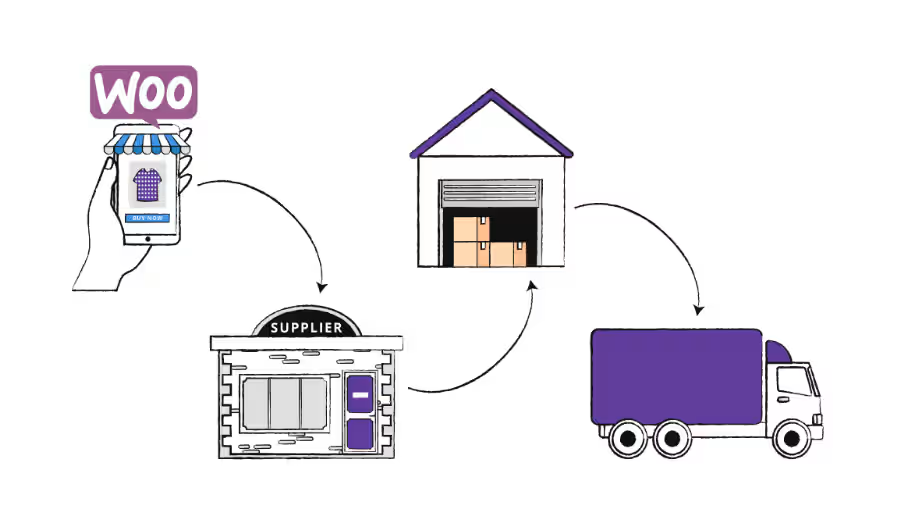
WooCommerce dropshipping is a business model where you sell products through a WooCommerce-powered website without stocking inventory. Instead, when a customer places an order, a third-party supplier fulfills and ships the product directly to them.
This setup allows you to focus on growth-driving activities like:
- Marketing
- Product research
- Store optimization
While your supplier handles:
- Inventory management
- Packaging
- Shipping
At its core, WooCommerce acts as your storefront and control center, while your suppliers act as your backend operations.
Why Choose WooCommerce for Dropshipping
Before diving into setup, it’s important to understand why WooCommerce stands out.
Unlike Shopify or other hosted platforms, WooCommerce is open-source. That means you’re not restricted by platform limitations—but it also means you’re responsible for more decisions.
1. Full Ownership and Control
With WooCommerce, you own your:
- Website
- Data
- Hosting
This gives you complete flexibility over how your business operates. You’re not tied to platform rules or limitations.
2. Better Long-Term Cost Efficiency
WooCommerce itself is free. Your main costs include:
- Hosting
- Domain
- Plugins
Over time, this can be more cost-effective compared to platforms with monthly fees and transaction cuts.
3. Advanced Customization
WooCommerce allows deep customization. You can:
- Modify design and UX
- Integrate advanced tools
- Optimize every part of your funnel
This makes it ideal for scaling beyond beginner-level ecommerce.
Challenges of WooCommerce Dropshipping
While WooCommerce is powerful, it’s not beginner-proof. Understanding the challenges early helps you avoid frustration later.
Technical Setup Can Be Complex
You need to:
- Set up hosting
- Install WordPress
- Configure WooCommerce
For non-technical users, this can feel overwhelming initially.
Plugin Dependency
Most dropshipping functionality depends on plugins.
This can lead to:
- Compatibility issues
- Extra costs
- Maintenance overhead
Performance Responsibility
Unlike hosted platforms, performance is your responsibility.
You need to manage:
- Website speed
- Security
- Updates
If neglected, these can hurt conversions and SEO.
How WooCommerce Dropshipping Works
Understanding how WooCommerce dropshipping works is essential before setting up your store. While the model seems simple on the surface, the success of your business depends on how well each step—from product listing to order fulfillment—is managed.
A clear grasp of this workflow helps you avoid operational mistakes and build a more efficient, scalable system.
The Basic Process
- You list products on your WooCommerce store
- A customer places an order
- The order is forwarded to your supplier
- The supplier ships the product
- You keep the profit margin
It’s simple in theory—but execution determines success.
How to Set Up a WooCommerce Dropshipping Store
Setting up a WooCommerce dropshipping store involves more than just installing a plugin and adding products. From choosing the right hosting to configuring essential tools and integrations, each step plays a role in how well your store performs.
Setting the setup right from the beginning helps you avoid technical issues, improve user experience, and create a strong foundation for scaling your business.
1. Choose a Domain and Hosting
Your hosting provider directly impacts:
- Speed
- Reliability
- SEO
Choose a provider that offers:
- Fast loading speeds
- High uptime
- Good support
Avoid cheap hosting that slows your store down.
2. Install WordPress and WooCommerce
WooCommerce runs on WordPress.
Setup steps:
- Install WordPress via your hosting
- Add the WooCommerce plugin
- Complete initial store setup
This includes:
- Currency
- Payment methods
- Shipping settings
3. Choose a High-Converting Theme
Your theme affects both design and performance.
Look for themes that are:
- Lightweight and fast
- Mobile-optimized
- Ecommerce-focused
Avoid overly complex themes that slow down your site.
4. Install Essential Plugins
Plugins are the backbone of WooCommerce dropshipping.
You’ll need tools for:
- Product importing
- Order automation
- SEO optimization
- Analytics tracking
Be selective—too many plugins can slow your site.
How to Find Winning Products for WooCommerce
Finding the right products is one of the most important factors in the success of your WooCommerce dropshipping store. Not every product will sell well, and choosing the wrong ones can waste both time and ad budget. By focusing on products with strong demand, clear value, and good margins, you can increase your chances of building a store that is easier to scale and sustain over time.
Characteristics of a Winning Product
A strong product typically:
- Solves a clear problem
- Has visual appeal
- Is easy to understand
- Has room for margin
Avoid These Product Traps
- Over-saturated items
- Low-quality products
- Items with unclear value
Instead, focus on:
- Trend-driven niches
- Underserved audiences
- Problem-solving products
Writing Product Pages That Convert
Your product page is where interest turns into action, making it one of the most critical parts of your WooCommerce dropshipping store. Even with great traffic, weak product pages can lead to lost sales. A well-optimized page that clearly communicates value, builds trust, and reduces hesitation can significantly improve conversions and overall revenue.
Focus on Benefits First
Instead of:
- Listing features
Explain:
- Why the product matters
- How it improves the user’s life
Use Strong Visuals
Your images should:
- Show product usage
- Build trust
- Reduce uncertainty
Add Trust Elements
Trust directly impacts conversions. Include:
- Customer reviews
- Clear policies
- FAQs
How to Optimize WooCommerce for SEO
Optimizing WooCommerce for SEO is essential if you want your store to attract consistent organic traffic without relying only on paid ads. From product pages and site structure to content and technical performance, every element contributes to how well your store ranks in search results.
A strong SEO foundation helps your products get discovered more easily and supports long-term growth for your dropshipping business.
Optimize Product Pages
Each product page should include:
- Keyword-rich titles
- Detailed descriptions
- Optimized images
Create Supporting Content
Blog content helps you:
- Rank for long-tail keywords
- Build authority
- Drive organic traffic
Improve Site Structure
A clean structure helps:
- Users navigate easily
- Search engines crawl efficiently
Best Plugins for WooCommerce Dropshipping
Plugins play a crucial role in making WooCommerce dropshipping efficient and scalable. Since WooCommerce does not come with built-in dropshipping features, the right combination of plugins helps automate tasks like product importing, order processing, tracking, and SEO.
Choosing reliable and well-integrated plugins can save time, reduce manual work, and improve overall store performance.
Product Import Tools
These help:
- Add products quickly
- Sync inventory
Automation Tools
Automate:
- Order processing
- Tracking updates
SEO and Marketing Tools
Improve:
- Visibility
- Conversions
How to Drive Traffic to Your WooCommerce Store
Driving traffic is essential for turning your WooCommerce store into a profitable business. Even with the right products and a well-designed website, your store cannot generate sales without consistent visitors. By combining paid and organic strategies, you can attract targeted traffic, increase visibility, and create multiple channels for sustainable growth.
Traffic is where growth begins.
Paid Traffic
Use platforms like:
- Facebook Ads
- Google Ads
- TikTok Ads
Organic Traffic
Focus on:
- SEO
- Content
- Social media
Influencer Marketing
This builds:
- Trust
- Social proof
Common Mistakes to Avoid
Even a well-designed WooCommerce store can struggle if a few core mistakes are ignored early on. Many dropshipping businesses do not fail because the model is broken—they fail because the execution is weak.
By avoiding these common errors, you can save time, reduce wasted spend, and build a store that is easier to manage and scale.
Overcomplicating Setup
A lot of store owners make the mistake of adding too many features, plugins, design elements, and product categories right from the start. While it may feel like you are building a stronger store, this often creates confusion, slows down performance, and makes the site harder to manage. A complicated setup can also distract visitors from the main goal, which is getting them to trust the store and make a purchase.
In the early stages, simplicity is usually more effective than trying to do everything at once. A focused store with a clean layout, essential pages, and a clear product offering is easier for both you and your customers. Once the basics are working well, you can always expand gradually based on real data and customer behavior.
Ignoring Speed Optimization
Site speed has a direct impact on both user experience and conversions. If your WooCommerce store takes too long to load, visitors are far more likely to leave before they even view your products. This not only hurts your sales but can also affect your search visibility and ad performance, since slow-loading pages often lead to lower engagement.
Many speed issues come from oversized images, poor-quality hosting, too many plugins, or heavy themes. That is why optimization should not be treated as a technical afterthought. A faster site feels more trustworthy, keeps users engaged for longer, and makes it easier for people to move through the buying journey without frustration.
Poor Product Selection
One of the biggest mistakes in WooCommerce dropshipping is choosing products without validating demand, value, or market fit. Some sellers focus only on what looks trendy without asking whether the product solves a real problem, has enough margin, or is something people will actually buy from an unknown store. No matter how good your website is, weak products make growth much harder.
A strong product should have clear appeal, a compelling use case, and room for profit after ads and fulfillment costs. It should also match the audience you are trying to attract. When product selection is poor, sellers often blame the ads or platform, when the real issue is that the offer itself was never strong enough to begin with.
Lack of Testing
Many WooCommerce store owners expect instant results and make decisions too quickly without proper testing. They launch one product, use one ad creative, set one price, and assume the result tells the whole story. In reality, successful dropshipping usually comes from testing multiple variables and learning what works before scaling.
Testing helps you make better decisions based on evidence rather than assumptions. You may find that the product is good but the pricing is wrong, or that the offer works but the creative needs improvement. Without testing, it becomes very difficult to know where the real problem is.
Areas you should test consistently include:
- Products: Not every product will resonate with your audience, even if it looks promising at first.
- Creatives: Different visuals, hooks, and ad angles can produce very different results.
- Pricing: Small changes in price, bundles, or offers can significantly affect conversions and profit margins.
A store that tests regularly is far more likely to improve over time than one that relies on guesswork.
Scaling Strategies That Work
Scaling a WooCommerce dropshipping store requires more than just increasing traffic or ad spend. It’s about building on what already works and expanding it in a controlled, data-driven way. By focusing on proven products, improving customer experience, and optimizing operations, you can grow your store sustainably without sacrificing profitability.
Focus on Winning Products
Double down on:
- Proven sellers
- High-margin items
Improve Customer Experience
Better experience leads to:
- Repeat purchases
- Higher LTV
Expand Strategically
Add:
- Complementary products
- Upsells
- Bundles
Why Tools Are Critical for WooCommerce Dropshipping
Manual operations don’t scale. As your store grows, you’ll need:
- Better product research
- Automation
- Data insights
This is where Dropshiptool becomes valuable. Instead of guessing, you can:
- Identify winning products faster
- Optimize listings
- Track performance
This reduces trial-and-error and speeds up growth.
Advanced Strategies to Grow Faster
Scaling a WooCommerce dropshipping store requires more than just increasing traffic or ad spend. It’s about building on what already works and expanding it in a controlled, data-driven way.
By focusing on proven products, improving customer experience, and optimizing operations, you can grow your store sustainably without sacrificing profitability.
Build a Brand, Not Just a Store
Branding allows:
- Higher pricing
- Better retention
Improve Conversion Rates
Small changes can increase revenue significantly.
Focus on:
- Page speed
- UX
- Trust signals
Use Data to Guide Decisions
Track:
- Conversion rates
- Customer behavior
- Profit margins
Conclusion
WooCommerce dropshipping offers a powerful combination of flexibility, control, and scalability—but success depends on how well you execute each step. From choosing the right products and optimizing your store to driving traffic and avoiding common mistakes, every decision plays a role in your long-term growth.
Unlike simpler platforms, WooCommerce rewards those who take the time to build a strong foundation. When you combine the right setup with consistent testing, better product selection, and a focus on customer experience, you create a store that is not just profitable—but sustainable.
If you want to streamline your workflow and make smarter decisions as you scale, start using Dropshiptool. It helps you discover winning products, optimize your listings, and grow your WooCommerce dropshipping store with more confidence and less guesswork.